Batch Photo Factory2.94
Publisher Description
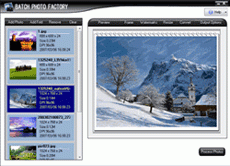
Batch Photo Factory has the ability to batch process your photos. You also can batch add frame, add watermark, convert,resize and rename lots of photos in ease. It is a useful and easy-to-use tool to prepare picuture for website, make the photo more smaller,lovely and protect your photos' copyright,all of the process can be done in batches.
Add lovely and prefessional frame to your photo make it unique and eye-catching. More than 100 frame templates included, and you can customize you own frame easily.
Batch Photo Factory can batch add your URL,copyright,comments or your logo as a watermark to your photo and prevent someone steal it from your website.There are two kinds of watermarks can be added: text watermark and Image watermark , both of them can be customized with angle, space,alphi etc.
In usually ,you should resize your photo to smaller size for website purpose,it is a fussy work, the software helps you do this in batch mode,you can resize thousands of files in a moment .
If you have a lot of pictures but in different formats , no problem! Batch Photo Factory lets you to convert your files to any of the following formats: BMP , GIF , JPG , TGA , PNG. You can set the output files property, such as color depth, quality.
About Batch Photo Factory
This Converters & Optimizers program is available in English. It was last updated on 29 September, 2026. Batch Photo Factory is compatible with the following operating systems: Windows.
The company that develops Batch Photo Factory is XQSoft. The latest version released by its developer is 2.94. This version was rated by 7 users of our site and has an average rating of 4.6.
The download we have available for Batch Photo Factory has a file size of 3.1 MB. Just click the green Download button above to start the downloading process. The program is listed on our website since 2007-12-13 and was downloaded 245 times. We have already checked if the download link is safe, however for your own protection we recommend that you scan the downloaded software with your antivirus. Your antivirus may detect the Batch Photo Factory as malware if the download link is broken.
How to install Batch Photo Factory on your Windows device:
- Click on the Download button on our website. This will start the download from the website of the developer.
- Once the Batch Photo Factory is downloaded click on it to start the setup process (assuming you are on a desktop computer).
- When the installation is finished you should be able to see and run the program.
Program Details
System requirements
Download information
Pricing
Version History
version 2.94
posted on 2007-12-13
2.93
version 2.93
posted on 2007-12-13
2.92
version 2.94
posted on 2007-12-13
2
version 2.13
posted on 2007-06-01
2.12
